
File format. IndiCATor accepts vegetation data in CSV (.csv) and Microsoft Excel (.xlsx) formats. The input file must contain a header row with column names. During processing, all column names are automatically converted to lowercase.
Required columns. The dataset must include a mandatory column named "species", containing taxon names.
Plot columns. At least one column must represent a plot (releve). Plot columns must begin with the prefix "plot" (e.g. plot1, plot2, plot_a). All columns whose names start with "plot" are interpreted as separate releves.
To add the prefix "plot" to all values in a horizontal row in Microsoft Excel, start by selecting any empty cell directly below the first cell of your data row. Enter the formula ="plot" & followed by the reference to the cell directly above it, then press Enter. Once the formula is in place, click on that cell to select it, grab the small square fill handle at its bottom-right corner, and drag it horizontally to the right across the entire row. Excel will automatically adjust the cell references for each column, applying the "plot" prefix to every value in the row.
Abundance values. Abundance values (e.g. percentage cover) must be numeric. If Braun-Blanquet symbols such as "+" or "r" are used, they should be converted to numeric values before upload (e.g. "+" -> 0.5, "r" -> 0.1). Zeros are automatically treated as missing values (NA). Empty cells may be left blank or filled with zeros, and zeros are automatically treated as missing values (NA).
Taxon naming. Although IndiCATor automatically resolves taxonomic synonyms, taxon names should preferably follow the Euro+Med PlantBase standard to ensure optimal matching. If aggregates are included, they may be indicated as "agg." or "aggr." (with a trailing period). Infraspecific taxa may be indicated as "v." or "var." (with a trailing period).
Optional layer column. The table may optionally contain a column named "layer" indicating vegetation layer. If this column is present, tree layer records can be excluded from analysis. In the "layer" column, the tree layer may be denoted as "A", "t1", "t2", or "t3". Information on other layers is not used. If the "layer" column is absent, all records are included and selective exclusion of the tree layer is not available.
Validation. If the file does not meet these requirements (e.g. missing required columns or incorrect delimiter), the upload will fail with an error message.
Common file formatting issues. When a dataset is saved as a CSV file, some spreadsheet software may introduce unintended empty rows, empty columns, or other formatting artifacts that can interfere with data processing. If the uploaded file cannot be processed correctly, open it in a plain text editor (e.g. Notepad) and verify that it does not contain any unexpected rows or columns outside the actual dataset. Removing such artifacts before uploading usually resolves the problem.
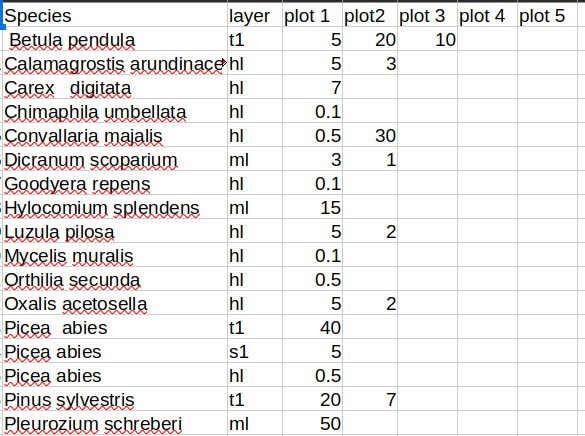
Test file. A test file can be downloaded here: Download test_file.csv.
Contact. If you have found errors or inaccuracies on our website, or if you have any suggestions or comments, you can contact us by email at icat.eco.info@gmail.com.